
Advanced tool use 文章的插图。
AI agents 的未来,是 models 可以在数百或数千个 tools 之间无缝工作。一个 IDE assistant 可以集成 git operations、file manipulation、package managers、testing frameworks 和 deployment pipelines。一个 operations coordinator 可以同时连接 Slack、GitHub、Google Drive、Jira、company databases 和数十个 MCP servers。
为了 build effective agents,它们需要使用 unlimited tool libraries,而不是预先把每个 definition 都塞进 context。我们关于使用 code execution with MCP 的 blog article 讨论了 tool results 和 definitions 有时如何在 agent 读取 request 之前就消耗 50,000+ tokens。Agents 应该按需发现和加载 tools,只保留与当前 task 相关的内容。
Agents 也需要从 code 中调用 tools 的能力。使用 natural language tool calling 时,每次 invocation 都需要一次完整 inference pass,而且 intermediate results 会堆积在 context 中,无论它们是否有用。Code 天然适合 orchestration logic,例如 loops、conditionals 和 data transformations。Agents 需要根据手头 task,在 code execution 和 inference 之间选择的灵活性。
Agents 也需要从 examples 中学习正确的 tool usage,而不只是 schema definitions。JSON schemas 定义结构上什么是 valid,但无法表达 usage patterns:什么时候包含 optional parameters、哪些 combinations 有意义,或你的 API 期望什么 conventions。
今天,我们发布三个让这成为可能的 features:
- Tool Search Tool,允许 Claude 使用 search tools 访问数千个 tools,而不消耗它的 context window
- Programmatic Tool Calling,允许 Claude 在 code execution environment 中调用 tools,减少对 model context window 的影响
- Tool Use Examples,提供一个 universal standard,用于展示如何有效使用给定 tool
在内部测试中,我们发现这些 features 帮助我们构建了 conventional tool use patterns 无法实现的东西。例如,Claude for Excel 使用 Programmatic Tool Calling 来读取和修改包含数千行的 spreadsheets,而不会让 model 的 context window 过载。
根据我们的经验,我们相信这些 features 为你用 Claude 构建什么打开了新的可能性。
挑战
MCP tool definitions 提供重要 context,但随着更多 servers 接入,这些 tokens 会累积起来。考虑一个 five-server setup:
- GitHub:35 tools(约 26K tokens)
- Slack:11 tools(约 21K tokens)
- Sentry:5 tools(约 3K tokens)
- Grafana:5 tools(约 3K tokens)
- Splunk:2 tools(约 2K tokens)
这 58 个 tools 在 conversation 甚至开始之前,就消耗约 55K tokens。再添加 Jira 这样的 servers(仅 Jira 就使用约 17K tokens),你很快就会接近 100K+ token overhead。在 Anthropic,我们见过 tool definitions 在 optimization 前消耗 134K tokens。
但 token cost 并不是唯一问题。最常见的 failures 是错误的 tool selection 和不正确的 parameters,尤其是在 tools 拥有相似名称时,例如 notification-send-user 与 notification-send-channel。
我们的解决方案
Tool Search Tool 不再预先加载所有 tool definitions,而是按需发现 tools。Claude 只会看到当前 task 实际需要的 tools。
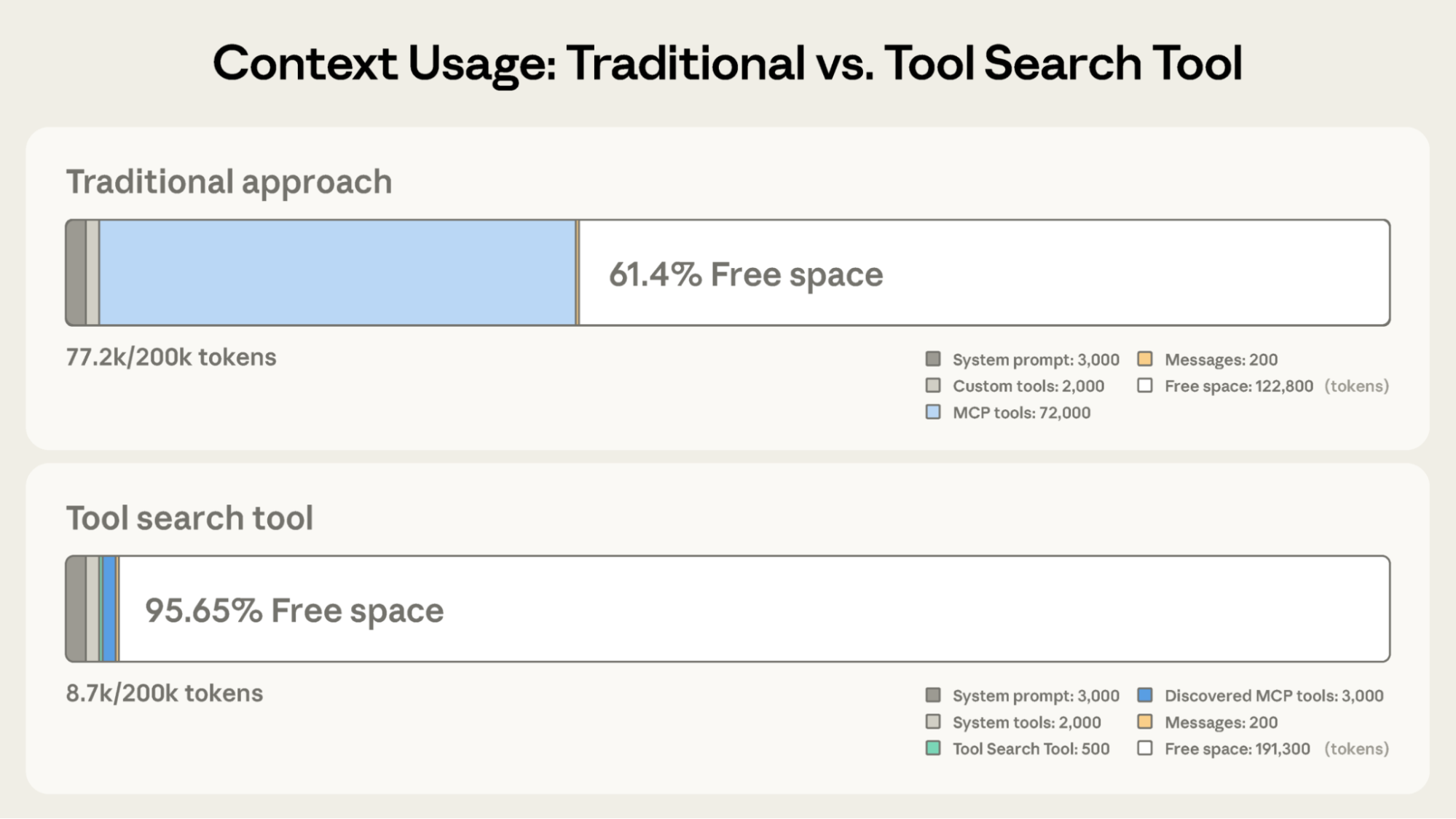
相比 Claude 传统方法中的 122,800 tokens,Tool Search Tool 保留了 191,300 tokens 的 context。
Traditional approach:
- 所有 tool definitions 预先加载(50+ MCP tools 约 72K tokens)
- Conversation history 和 system prompt 争夺剩余空间
- 在任何工作开始前,总 context consumption 约 77K tokens
使用 Tool Search Tool:
- 只有 Tool Search Tool 预先加载(约 500 tokens)
- Tools 按需发现(3-5 个 relevant tools,约 3K tokens)
- 总 context consumption 约 8.7K tokens,保留 95% 的 context window
这代表 token usage 减少 85%,同时仍保持对完整 tool library 的 access。Internal testing 显示,在处理 large tool libraries 时,启用 Tool Search Tool 后 MCP evaluations 上的 accuracy 显著提升。Opus 4 从 49% 提升到 74%,Opus 4.5 从 79.5% 提升到 88.1%。
Tool Search Tool 如何工作
Tool Search Tool 让 Claude 动态发现 tools,而不是预先加载所有 definitions。你把所有 tool definitions 提供给 API,但用 defer_loading: true 标记 tools,让它们可以按需发现。Deferred tools 初始不会加载到 Claude 的 context 中。Claude 只会看到 Tool Search Tool 本身,以及任何 defer_loading: false 的 tools(你最关键、最常用的 tools)。
当 Claude 需要 specific capabilities 时,它会搜索 relevant tools。Tool Search Tool 返回 matching tools 的 references,这些 references 会被展开成 Claude context 中的完整 definitions。
例如,如果 Claude 需要与 GitHub 交互,它会搜索 “github”,并且只有 github.createPullRequest 和 github.listIssues 会被加载,而不是你来自 Slack、Jira 和 Google Drive 的另外 50+ tools。
这样,Claude 可以访问完整 tool library,同时只为它实际需要的 tools 支付 token cost。
Prompt caching note: Tool Search Tool 不会破坏 prompt caching,因为 deferred tools 会完全从 initial prompt 中排除。它们只会在 Claude 搜索之后添加到 context 中,因此你的 system prompt 和 core tool definitions 仍然可以 cache。
Implementation:
{
  "tools": [
    // Include a tool search tool (regex, BM25, or custom)
    {"type": "tool_search_tool_regex_20251119", "name": "tool_search_tool_regex"},

    // Mark tools for on-demand discovery
    {
      "name": "github.createPullRequest",
      "description": "Create a pull request",
      "input_schema": {...},
      "defer_loading": true
    }
    // ... hundreds more deferred tools with defer_loading: true
  ]
}
{
  "type": "mcp_toolset",
  "mcp_server_name": "google-drive",
  "default_config": {"defer_loading": true}, # defer loading the entire server
  "configs": {
    "search_files": {
"defer_loading": false
    }  // Keep most used tool loaded
  }
}
Claude Developer Platform 开箱提供 regex-based 和 BM25-based search tools,但你也可以使用 embeddings 或其他 strategies 实现 custom search tools。
什么时候使用 Tool Search Tool
像任何 architectural decision 一样,启用 Tool Search Tool 涉及 trade-offs。这个 feature 会在 tool invocation 前增加一个 search step,因此当 context savings 和 accuracy improvements 超过 additional latency 时,它会带来最佳 ROI。
适合使用它的情况:
- Tool definitions 消耗 >10K tokens
- 遇到 tool selection accuracy issues
- 构建由 MCP 驱动、包含多个 servers 的 systems
- 有 10+ tools 可用
收益较小的情况:
- Small tool library(<10 tools)
- 每个 session 中都频繁使用所有 tools
- Tool definitions 很 compact
Programmatic Tool Calling
挑战
随着 workflows 变得更复杂,traditional tool calling 会产生两个根本问题:
- Intermediate results 带来的 context pollution:当 Claude 分析一个 10MB log file 以寻找 error patterns 时,整个 file 都会进入它的 context window,即使 Claude 只需要 error frequencies 的 summary。当跨多个 tables 获取 customer data 时,不论 relevance 如何,每条 record 都会累积在 context 中。这些 intermediate results 会消耗巨大的 token budgets,并可能把重要 information 完全挤出 context window。
- Inference overhead 和 manual synthesis:每次 tool call 都需要一次完整 model inference pass。收到 results 后,Claude 必须“目测”data 以提取 relevant information,reason 各部分如何组合,并决定下一步做什么,全都通过 natural language processing。一个 five tool workflow 意味着五次 inference passes,再加上 Claude parsing 每个 result、比较 values 和 synthesizing conclusions。这既慢又容易出错。
Programmatic Tool Calling 让 Claude 可以通过 code orchestrate tools,而不是通过单独 API round-trips。Claude 不再一次请求一个 tool,并把每个 result 返回到它的 context;相反,Claude 会编写 code 来调用多个 tools、处理 outputs,并控制哪些 information 实际进入它的 context window。
Claude 擅长写 code;让它用 Python 表达 orchestration logic,而不是通过 natural language tool invocations 表达,你会获得更 reliable、更 precise 的 control flow。Loops、conditionals、data transformations 和 error handling 都在 code 中显式呈现,而不是隐含在 Claude 的 reasoning 中。
考虑一个常见 business task:“哪些 team members 超出了他们的 Q3 travel budget?”
你有三个可用 tools:
get_team_members(department)- 返回带 IDs 和 levels 的 team member listget_expenses(user_id, quarter)- 返回某个 user 的 expense line itemsget_budget_by_level(level)- 返回某个 employee level 的 budget limits
Traditional approach:
- 获取 team members → 20 人
- 对每个人获取 Q3 expenses → 20 次 tool calls,每次返回 50-100 line items(flights、hotels、meals、receipts)
- 按 employee level 获取 budget limits
- 所有这些都进入 Claude 的 context:2,000+ expense line items(50 KB+)
- Claude 手动汇总每个人的 expenses,查找他们的 budget,将 expenses 与 budget limits 比较
- 更多到 model 的 round-trips,显著的 context consumption
使用 Programmatic Tool Calling:
每个 tool result 不再返回给 Claude,而是 Claude 编写一个 Python script 来 orchestrate 整个 workflow。Script 在 Code Execution tool(一个 sandboxed environment)中运行,并在需要你的 tools 的 results 时暂停。当你通过 API 返回 tool results 时,它们由 script 处理,而不是被 model 消耗。Script 继续执行,而 Claude 只看到最终 output。
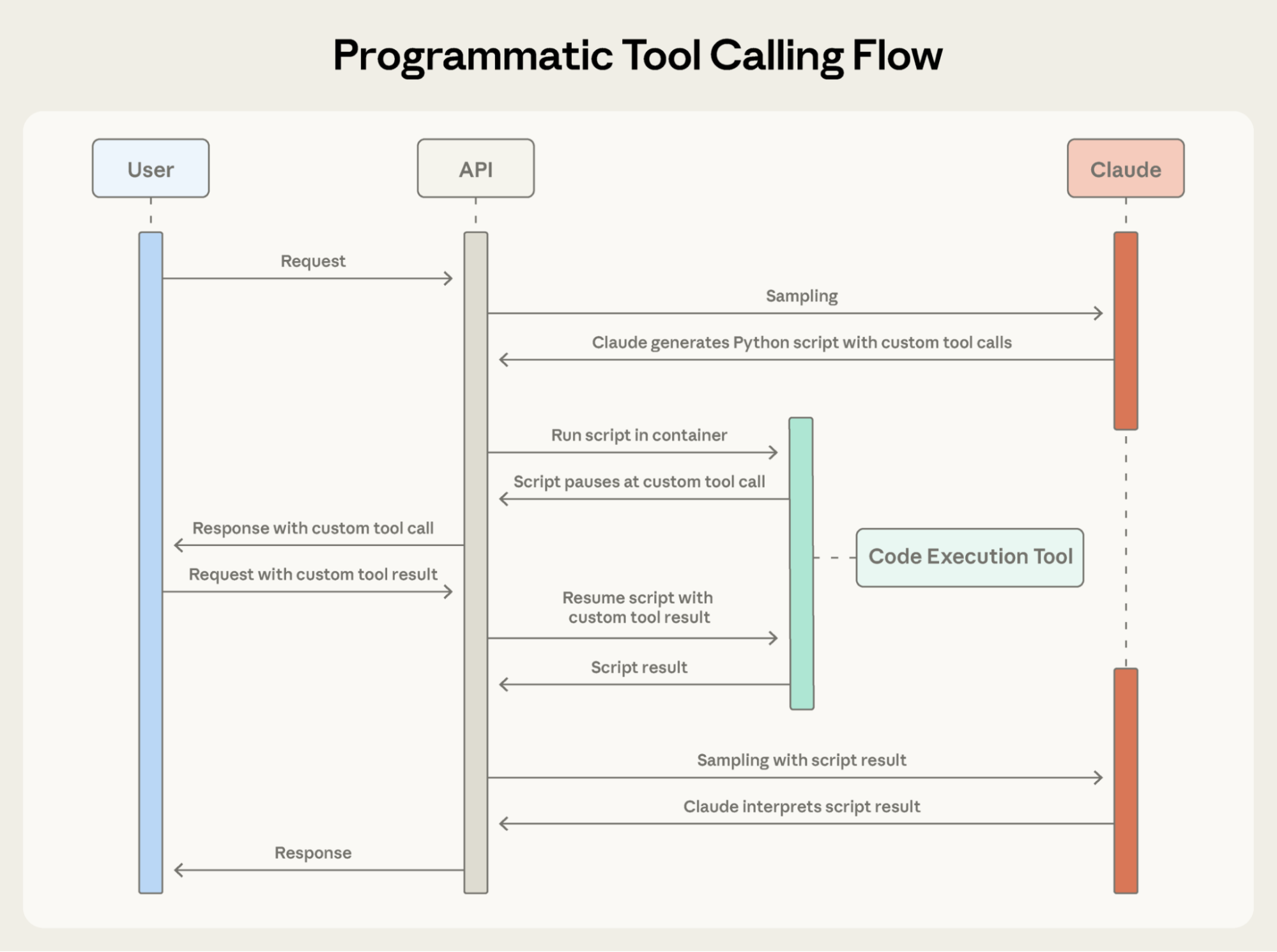
Programmatic Tool Calling 让 Claude 通过 code 而不是单独 API round-trips orchestrate tools,从而允许 parallel tool execution。
下面是 Claude 为 budget compliance task 编写的 orchestration code 的样子:
Claude 的 context 只收到最终 result:超出 budget 的两到三个人。2,000+ line items、intermediate sums 和 budget lookups 都不会影响 Claude 的 context,把 consumption 从 200KB raw expense data 降到只有 1KB results。
Efficiency gains 很可观:
- Token savings:通过把 intermediate results 保持在 Claude context 外,PTC 显著减少 token consumption。在复杂 research tasks 上,平均 usage 从 43,588 降至 27,297 tokens,减少 37%。
- Reduced latency:每次 API round-trip 都需要 model inference(数百毫秒到数秒)。当 Claude 在单个 code block 中 orchestrate 20+ tool calls 时,你消除了 19+ inference passes。API 会处理 tool execution,而不是每次都返回 model。
- Improved accuracy:通过编写显式 orchestration logic,Claude 比用 natural language juggling 多个 tool results 时更少出错。Internal knowledge retrieval 从 25.6% 提升到 28.5%;GIA benchmarks 从 46.5% 提升到 51.2%。
Production workflows 涉及 messy data、conditional logic,以及需要 scale 的 operations。Programmatic Tool Calling 让 Claude 以 programmatic 方式处理这种 complexity,同时把它的焦点保持在 actionable results 上,而不是 raw data processing。
Programmatic Tool Calling 如何工作
把 code_execution 添加到 tools,并设置 allowed_callers,以便为 programmatic execution opt-in tools:
API 会把这些 tool definitions 转换为 Claude 可以调用的 Python functions。
2. Claude 编写 orchestration code
Claude 不再一次请求一个 tool,而是生成 Python code:
3. Tools 执行而不进入 Claude 的 context
当 code 调用 get_expenses() 时,你会收到一个带 caller field 的 tool request:
你提供 result,它会在 Code Execution environment 中处理,而不是 Claude 的 context 中。这个 request-response cycle 会对 code 中的每个 tool call 重复。
4. 只有最终 output 进入 context
当 code 完成运行时,只有 code 的 results 会返回给 Claude:
这就是 Claude 看到的全部内容,而不是过程中处理的 2000+ expense line items。
什么时候使用 Programmatic Tool Calling
Programmatic Tool Calling 会向 workflow 添加 code execution step。当 token savings、latency improvements 和 accuracy gains 足够大时,这个额外 overhead 就值得。
最有收益的情况:
- 处理 large datasets,而你只需要 aggregates 或 summaries
- 运行包含三个或更多 dependent tool calls 的 multi-step workflows
- 在 Claude 看到 tool results 之前 filtering、sorting 或 transforming 它们
- 处理 intermediate data 不应影响 Claude reasoning 的 tasks
- 跨许多 items 运行 parallel operations(例如检查 50 个 endpoints)
收益较小的情况:
- 执行 simple single-tool invocations
- 处理 Claude 应该看到并 reason about 所有 intermediate results 的 tasks
- 运行响应很小的 quick lookups
Tool Use Examples
JSON Schema 擅长定义 structure,也就是 types、required fields、allowed enums,但它无法表达 usage patterns:什么时候包含 optional parameters、哪些 combinations 有意义,或你的 API 期望什么 conventions。
考虑一个 support ticket API:
Schema 定义了什么是 valid,但留下了关键问题没有回答:
- Format ambiguity:
due_date应该使用 “2024-11-06”、“Nov 6, 2024”,还是 “2024-11-06T00:00:00Z”? - ID conventions:
reporter.id是 UUID、“USR-12345”,还是只是 “12345”? - Nested structure usage: Claude 什么时候应该填充
reporter.contact? - Parameter correlations:
escalation.level和escalation.sla_hours如何与 priority 关联?
这些 ambiguities 可能导致 malformed tool calls 和 inconsistent parameter usage。
我们的解决方案
Tool Use Examples 让你可以直接在 tool definitions 中提供 sample tool calls。你不再只依赖 schema,而是向 Claude 展示具体 usage patterns:
从这三个 examples 中,Claude 学会:
- Format conventions:Dates 使用 YYYY-MM-DD,user IDs 遵循 USR-XXXXX,labels 使用 kebab-case
- Nested structure patterns:如何构造带 nested contact object 的 reporter object
- Optional parameter correlations:Critical bugs 有完整 contact info + 带 tight SLAs 的 escalation;feature requests 有 reporter 但没有 contact/escalation;internal tasks 只有 title
在我们自己的 internal testing 中,tool use examples 在 complex parameter handling 上把 accuracy 从 72% 提升到 90%。
什么时候使用 Tool Use Examples
Tool Use Examples 会向你的 tool definitions 添加 tokens,因此当 accuracy improvements 超过 additional cost 时,它们最有价值。
最有收益的情况:
- Complex nested structures,其中 valid JSON 并不意味着 correct usage
- Tools 有许多 optional parameters,且 inclusion patterns 很重要
- APIs 有 schemas 未捕捉的 domain-specific conventions
- 相似 tools,需要 examples 澄清使用哪一个(例如
create_ticketvscreate_incident)
收益较小的情况:
- 用法明显的 simple single-parameter tools
- Claude 已经理解的 standard formats,例如 URLs 或 emails
- 更适合由 JSON Schema constraints 处理的 validation concerns
构建能采取现实世界 actions 的 agents,意味着同时处理 scale、complexity 和 precision。这三个 features 协同工作,解决 tool use workflows 中不同 bottlenecks。下面是如何有效组合它们。
战略性地分层使用 features
并非每个 agent 都需要为给定 task 使用全部三个 features。从你最大的 bottleneck 开始:
- Tool definitions 导致 context bloat → Tool Search Tool
- Large intermediate results 污染 context → Programmatic Tool Calling
- Parameter errors 和 malformed calls → Tool Use Examples
这种 focused approach 让你解决限制 agent performance 的具体 constraint,而不是一开始就添加 complexity。
然后按需叠加 additional features。它们是 complementary 的:Tool Search Tool 确保找到正确 tools,Programmatic Tool Calling 确保 efficient execution,Tool Use Examples 确保 correct invocation。
设置 Tool Search Tool 以获得更好的 discovery
Tool search 会匹配 names 和 descriptions,因此清晰、descriptive definitions 会提高 discovery accuracy。
添加 system prompt guidance,让 Claude 知道有什么可用:
保持最常用的三到五个 tools 始终加载,其余 defer。这会在 common operations 的 immediate access 与其他所有内容的 on-demand discovery 之间取得平衡。
设置 Programmatic Tool Calling 以获得正确 execution
由于 Claude 会编写 code 来 parse tool outputs,因此清楚记录 return formats。这有助于 Claude 编写正确 parsing logic:
请参见下方适合 programmatic orchestration 的 opt-in tools:
- 可以 parallel 运行的 tools(independent operations)
- 可以安全 retry 的 operations(idempotent)
设置 Tool Use Examples 以获得 parameter accuracy
为 behavioral clarity 编写 examples:
- 使用 realistic data(真实 city names、plausible prices,而不是 “string” 或 “value”)
- 用 minimal、partial 和 full specification patterns 展示 variety
- 保持简洁:每个 tool 1-5 个 examples
- 聚焦 ambiguity(只在 correct usage 无法从 schema 中明显看出时添加 examples)
这些 features 以 beta 形式提供。要启用它们,请添加 beta header 并包含你需要的 tools:
有关详细 API documentation 和 SDK examples,请参见我们的:
这些 features 把 tool use 从 simple function calling 推向 intelligent orchestration。当 agents 处理跨数十个 tools 和大型 datasets 的更复杂 workflows 时,dynamic discovery、efficient execution 和 reliable invocation 会成为基础。
我们很期待看到你构建什么。
作者:Bin Wu,并感谢 Adam Jones、Artur Renault、Henry Tay、Jake Noble、Noah Picard、Sam Jiang 和 Claude Developer Platform team 的贡献。这项工作建立在 Chris Gorgolewski、Daniel Jiang、Jeremy Fox 和 Mike Lambert 的 foundational research 之上。我们也从整个 AI ecosystem 中汲取了灵感,包括 Joel Pobar 的 LLMVM、Cloudflare 的 Code Mode 和 Code Execution as MCP。特别感谢 Andy Schumeister、Hamish Kerr、Keir Bradwell、Matt Bleifer 和 Molly Vorwerck 的支持。